Showing posts with label ios. Show all posts

Sunday, March 13, 2016

iphone,iPad ႏွင့္ ipod touch မ်ားတြင္ ေဇာ္ဂ်ီေဖာင့္သြင္းနည္း အျပည့္အစံု

iPhone နဲ႕ iPod touch ထဲမွာ ေဇာ္ဂ်ီေဖာင့္သြင္းဖုိ႕အတြက္ jailbreak လုပ္ထားဖုိ႕လုိအပ္ပါတယ္။
jailbreak လုပ္နည္း youtube Video ကိိုေအာက္မွာၾကည့္လိုက္ပါ။

ပထမနည္း
Jailbreak ios 6.0.1 iPhone 5, iPad mini, iPod touch and all Devices (Burmese 
                            

Published on Feb 9, 2013
In this video tutorial I show you how to Jailbreak iPhone, iPad, and iPod touch iOS 6.0.1 With new Evasi0n Jailbreak
လိုအပ္သည့္ ဖိုင္မ်ား ေဒါင္းႏိုင္ရန္
Download Link:▼
Evasi0n Jailbreak Downloads ►http://bit.ly/XuLYDB
Subscribe to my YouTube channel ►http://bit.ly/Xue7Zy
Thanks You For Watching.

ဒုတိယနည္း
How to jailbreak iPhone 4,4s,5 "iOS 6.1.3" www.myanmarteach.com


♀♀♀♀♀♀♀♀♀♀♀♀♀♀♀
လိုအပ္သည့္ ဖိုင္မ်ား ေဒါင္းႏိုင္ရန္ 
Download Link:▼
Redsn0w Link:►http://bit.ly/PY8vdb
Download iOS 6.0.1 for iPhone 5 GSM►http://bit.ly/WbGRMg
Download iOS 6.0.1 for iPhone 5 CDMA►http://bit.ly/SfqKX3
Download iOS 6.0.1 for iPhone 4S►http://bit.ly/SrIHTl
Download iOS 6.0.1 for iPhone 4 GSM►http://bit.ly/SrIkZ8
Download iOS 6.0.1 for iPhone 4 CDMA►http://bit.ly/WbGRMn
Download iOS 6.0.1 for iPhone 3GS►http://bit.ly/SfqKX7

ေဇာ္ဂ်ီေဖာင့္သြင္းနည္း
jailbreak လုပ္ျပီးသားစက္ေတြအတြက္လုပ္နည္းကုိေျပာျပပါ့မယ္။ ေဇာ္ဂ်ီေဖာင့္သြင္းဖုိ႕အတြက္ အင္တာနက္ကြန္နက္ရွင္ရွိရပါမယ္။ ကုိယ့္ရဲ႕ iPhone/Pod ထဲက
Cydia ကို သြားပါ။ ျပီးလွ်င္ manage ေအာက္က Source ကုိသြားပါ။ Edit ကေန Add လုပ္လိုက္ပါ ။ Address တြင္
http://cydia.macforus.com ကုိထည့္ပါ ။


ျပီးသြားရင္ Cydia >. Manage >>Sources >> cydia.macforus.com ထဲကေန Zawgyi iOS 4.3 Font ကိုရွာျပီး Install လုုပ္လုိက္ပါ။
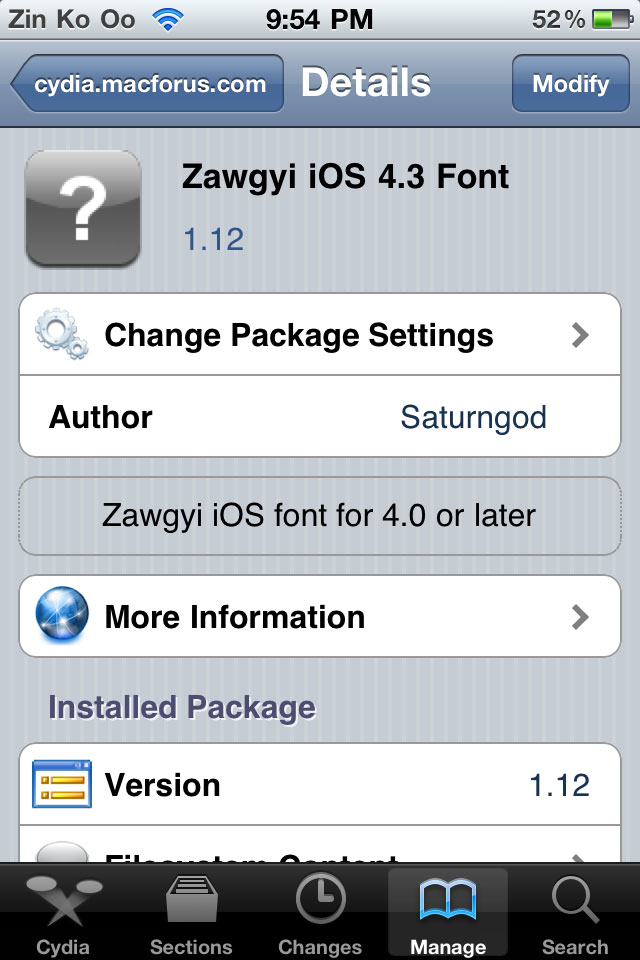


ျပီးသြားျပီဆုိရင္ စက္ကုိ Respring လုပ္ (သုိ႕မဟုတ္) power ပိတ္ျပီးျပန္ဖြင့္ပါ။ ျမန္မာစာနဲ႕ေရးထားတဲ့စာသားေတြကုိ ျမန္မာလုိျမင္ရျပီျဖစ္ပါတယ္


ေနာက္တနည္း
How To Install Zawgyi (Myanmar) Font To iPod
ၿမန္မာစာ ထည့္ဖုိ့ဆိုရင္ iPod Jail Break ရပါမယ္။
ပထမဆံုး Cydia ကိုသြားၿပီး "Souces" ကိုေရြးလိုက္ပါ...
It only works in Jail Broken iPods...
First, go to Cydia and tap "Sources" as shown below.


Tap Edit and than Add 


Than.., type http://cydia.macforus.com/
and tap "Add Source"


And the screen shown below will appear.., 
It will take about 30 secs depends on your WiFi or what ever speed is..,


After that, Go back to Cydia/Manage/ and tap where the red circle is shown.


And next.., tap on "Zawgyi Font" where the red circle is shown. 


Than tap on "Install" where the red box is placed. 


After Downloaded, (seeing those black staff) 
Cydia will ask you to respring...
After you respring.., Just go to Safari
and type down some burmese website..,
I used "soneseayar.blogspot.com"
And.., here you go.. enjoy reading myanmar words in your iPod

ဗြီဒီယိုနဲ႕ၾကည့္ႏိုင္ရန္
Myanmar Zawgyi font and keyboard for iPhone4/4s iOS 5.1.1 And iOS
                                   

How To Enable Myanmar Font in iPod Touch or iPhone
                                   

http://netthitsar.blogspot.com/2012/09/1-iphoneipad-ipod-touch.html

IT Guide Myanmar မွ ကူးယူတင္ျပအပ္ပါတယ္။
ေရာက္လာသူအားလံုး ကိုယ္စိတ္နွစ္ျဖာ ခ်မ္းျမသာယာရွိၾကပါေစ။

iPhone အၾတက္ Free Applications ႏြင့္ Games မ်ားထၫ့္သြင္းနၫ္း

RFF: http://www.moethagyar.info/2010/02/iphone-free-applications-games.html
ေရးမယ္ ေရးမယၷဲ ့ အပ္င္းတစ္ေနလိုကၱာ Post တစၡဳနဲ ့ တစၡဳၾကားမြာ အရမ္းၾကာၾသားတယၺ္ာ ျခင့္လႊတၷားလၫ္ေပးၾကပါ အလုပၲစၹကၷဲ ့မို ့ တစၡါတစ္ရံ blog ဘကၼလြၫ့္ ႏိုငၻဴး ်ဖစ္ေနတယ္
ကဲ ဒီေန ့ေတာ့ေရးပီဗ္ာ.... ဒီ Post ေကတာ့ Jailbreak ်ဖစ္ၿပီးသား iPhone ေၾတ အၾတကၸဲေနာ္ Firmware 3.1.2, 3.1.3 ပဲ်ဖစ္်ဖစ္ Firemware အားလံုးႏြင့္ အႀကံဳးဝငၸါတယ္။
Free App ႏြင့္ Games မ္ား ကို Full version ေအနနဲ ့ရယူၾသားႏိုင္ရႏ္ နၫ္းလမ္းေလးပါ။

ပထမဦးျစာ သင့္ရဲ ့iPhone(3G,3Gs) သၫ္ Jailbreak လုပၸီးသား ်ဖစ္ရပါမယ္၊ Jailbreak လုပၸံဳ အဆင့္ဆင့္ ကို ဒီမြာ (Firmware 3.1.2 , Firmware 3.1.3 ) ်ပႏႅၫၹတ္ရႈပါ။

Jailbreak ်ဖစ္ၿပီးသား iPhone ရဲ ့Home Screen မြာ Cydia Application ရြိေနမြာပါ။


၁) Cydia ကို ျဖင့္ပါ (iPhone Home မြာရြိပါတယ္)
၂) Manage ----> Sources ကိုၾသားပါ။

၃) Source ရဲ ့URL ကို်ဖၫ့္ၾသင္းမြာ်ဖစၲဲ့ အၾတက္
Edit ကို ႏြိပ္ၿပီး Add ကို ထပ္ႏြိပ္ေပးပါ၊ ထိုအခါ URL ်ဖၫ့္ရႏ္ Box တစၡဳ ေပၚလာပါမယ္


၄) Box ထဲၾတင္ http://cydia.hackulo.us ဟု ရိုကၳၫ့္ေပးၿပီး Add Source ကိုႏြိပ္ေပးပါ၊
အခုဆိုရင္ သင့္ရဲ ့Source မြာ Hackulo.us ဆိုၿပီး ေအာကၸါပံု အတိုင္းရပါၿပီ။
ၿပီးရင္ Done ကို ႏြိပၸါ။

၅) Search ကိုႏြိပ္ၿပီး Search box ထဲၾတင္ Installous ဟုရိုကၳၫ့္ၿပီးရြာေပးပါ၊


မြတၡ္က္။ ။ search box ၾတင္ စာရိုက္ေနခ္ိျႏၲင္ Keyboard အလုပႅဳပၼႈေႏြးေၾကးၾသားမြာ ်ဖစၲဲ့ အၾတက္ တစႅံဳး်ခင္း cursor ကို ေစာင့္ရိုကၸါ။

၆) Installous ကို ေၾတ ့ၿပီဆိုပါ က install လုပၸါ။ ေအာကၸါပံုအတိုင္း တစၧင့္်ခင္းၾသားပါ။


၇) Installous install လုပ္ၿပီးၾသားပါက သင့္ iPhone Home page မြာ ေအာကၸါအတိုင္းေၾတ ့ရပါမယ္။


အခုဆိုရင္ Installous App လုပ္်ခင္းၿပီးဆံုးပါၿပီ။

၈) Installous ကို ႏြိပၸါက သင္ အလိုရြိတဲ့ App ေၾတ Games ေၾတကို Free Download ရယူႏိုငၸါၿပီ။
လိုခ္င္ေသာ App ကို ရြာေၾတ ့ၿပီ ဆိုပါက ခ္က္်ခင္း Install မလုပၸဲ Download အရငႅဳပၸါ ၿပီးမြ Install လုပၹိဳ ့ သတိေပးပါေရစ။


Download လုပ္ၿပီးသား App ေၾတ ကို Installous ရဲ ့ Downloads ထဲမြာ ရြိေနပါတယ္။

မြတၡ္က္။ ။ Phone ကတဆင့္ download လုပၸါက အခ္ိဳ ့App မ္ားသၫ္ နာရီနဲ ့ခ္ီၾကာတတ္ၿပီး connection ေမကာင္းပါက ဆက္ၿပီး အလုပၼလုပၲာမ္ိဳး ်ဖစၲတၱဲ့ အၾတက္ PC ေမြနၿပီး http://apptrackr.org/ ၾတင္ Download လုပ္်ခင္းသၫ္ ေအကာင္းဆံုး ်ဖစၸါတယ္။

ေအရးႀကီးေသာ မ်ဖေစၼနလုပ္ေဆာင္ရမၫ့္ အဆင့္

ယခုကဲ့သို ့သီးသႏ္ ့ေရးသားရတာေကတာ့ အခ္ိဳ ့iPhone မ္ားသၫ္ Jailbroken လဲ်ဖစ္ၿပီးၿပီ Installous အသံုး်ပဳၿပီးေတာ့လဲ App ေၾတ Download ခ္ႏိုငၸါၿပီ သို ့ေပမယ့္ Application ေၾတ Run တဲ့အခါမြာ Error တတ္ေနတတၸါတယ္ ဒီ်ပသနာအၾတက္ ေအာက္ေဖာ္်ပပါ အဆင့္တစၡဳ လုပ္ရႏၠ္ႏ္ရြိေနလို ့ပါပဲ။
ကၽျႏ္ေတာ့္ရဲ ့ post ကိုဖတ္ၿပီး တစၧင့္်ခင္းလုပ္ၾကသူမ္ားလၫ္း ေအာကၸါ အဆငိ့မ္ားကို မ်ဖေစၼနလုပ္ေဆာငၸါ။

ကဲစလိုေက္ရအာင္

၁) Home Page မြ ေန၍ Cydia သို ့ၾသားပါ
၂) Cydia --> Manage --> Packages သို ့ၾသားပါက ေအာကၸါအတိုင္းေၾတ ့ရပါမၫ္။


AppSync for OS 3.1 ကို ႏြိပ္ၿပီး Install လုပ္ေပးလိုကၸါ ေအာကၸါ အတိုင္း အမြႏ္်ခစ္ေလးရၿပီ 
ဆိုရင္ေတာ့ အားလံုးၿပီးဆံုးၾသားပါၿပီ။


iPhone user မ္ားအားလံုး အဆင္ေ်ေပခ္ာေျမ ့ႏိုငၸါေစ. . . .

Monday, March 7, 2016

iphone ipad ေတြမွာ Apps & Game ေတြသြင္းဖို႔လြယ္တဲ႔ Itool Software


iTunes ထက် သုံးရတာ လွယ်ကူပြီး မြန်ဆန်စေပါတယ် ..။ တချို့ app & game တွေဟာ iTunes ကေန iPhone ထဲကို ထည့္ရင္ error တတ္တတ္တာမ်ိဳးေတြရွိပါတယ္ ။ က်ေနာ့ လက္ေတြ႕ကေတာ့ iTunes နဲ႔ ထည့္လို႔မရတဲ႔ app & game ေတြဟာ ဒီ iTools နဲ႔မွ အဆင္ေျပ ေအာင္ျမင္စြာနဲ႔ သြင္းထည့္ႏိုင္တာမ်ိဳးေတြ ၾကံဳဖူးပါတယ္..။

ဒီ iTools ေလးက app & game တင္မကပါဘူး ... သီခ်င္း၊ ဓါတ္ပံု၊ringtone စတဲ့ မီဒီယာဖိုင္ ေတြ ကိုလည္း ေခ်ာေမြ႕လြယ္ကူစြာ manageလုပ္ေပးႏိုင္တဲ႔အျပင္ အျခားေသာ Features ေတြလဲ မ်ားစြာ ပါဝင္ပါေသးတယ္...။ iPhone ခ်စ္သူမ်ား ဒီ iTools ေလးကို စမ္းအသံုးျပဳၾကည့္ပါလို႔လဲ တိုက္တြန္းခ်င္ပါတယ္..။ ..က်ေနာ္ကေတာ့ iTools မွiTools ပါပဲ...။


ဖိုင္ဆိုက္ဒ္ကလဲ ေပါ့ေပါ့ ပါးပါး 2.0 Mb ပဲရွိပါတယ္...။
စိတ္ဝင္စားလို႔ စမ္းသံုးၾကည့္ခ်င္တယ္ဆိုရင္ေတာ့ 

ဒါကေတာ့ ( 16 Feb 2012 ) ေန႔ကထြက္တဲ႔ ေနာက္ဆံုး Version ပါ..။

ဒါေတြကေတာ့ အရင္က Version ေတြပါ..။

တရုတ္ လိုတတ္တဲ႔ သူငယ္ခ်င္းမ်ားအတြက္လဲ ရွိပါေသးတယ္..။

ဒါကေတာ့ Mac OS အတြက္ပါ..။

Source : ဝင္းကမာၻေက်ာ္(နည္းပညာမွတ္တမ္း)