iPhone နဲ႕ iPod touch ထဲမွာ ေဇာ္ဂ်ီေဖာင့္သြင္းဖုိ႕အတြက္ jailbreak လုပ္ထားဖုိ႕လုိအပ္ပါတယ္။
jailbreak လုပ္နည္း youtube Video ကိိုေအာက္မွာၾကည့္လိုက္ပါ။
ပထမနည္း
Jailbreak ios 6.0.1 iPhone 5, iPad mini, iPod touch and all Devices (Burmese
Published on Feb 9, 2013
Visit► http://bit.ly/WGXMXS
In this video tutorial I show you how to Jailbreak iPhone, iPad, and iPod touch iOS 6.0.1 With new Evasi0n Jailbreak
လိုအပ္သည့္ ဖိုင္မ်ား ေဒါင္းႏိုင္ရန္
Download Link:▼
Evasi0n Jailbreak Downloads ►http://bit.ly/XuLYDB
Subscribe to my YouTube channel ►http://bit.ly/Xue7Zy
Follow me on Fb► https://www.facebook.com/myanmartutorial
Thanks You For Watching.
ဒုတိယနည္း
How to jailbreak iPhone 4,4s,5 "iOS 6.1.3" www.myanmarteach.com
♀♀♀♀♀♀♀♀♀♀♀♀♀♀♀
လိုအပ္သည့္ ဖိုင္မ်ား ေဒါင္းႏိုင္ရန္
Download Link:▼
Redsn0w Link:►http://bit.ly/PY8vdb
Download iOS 6.0.1 for iPhone 5 GSM►http://bit.ly/WbGRMg
Download iOS 6.0.1 for iPhone 5 CDMA►http://bit.ly/SfqKX3
Download iOS 6.0.1 for iPhone 4S►http://bit.ly/SrIHTl
Download iOS 6.0.1 for iPhone 4 GSM►http://bit.ly/SrIkZ8
Download iOS 6.0.1 for iPhone 4 CDMA►http://bit.ly/WbGRMn
Download iOS 6.0.1 for iPhone 3GS►http://bit.ly/SfqKX7
ေဇာ္ဂ်ီေဖာင့္သြင္းနည္း
jailbreak လုပ္ျပီးသားစက္ေတြအတြက္လုပ္နည္းကုိေျပာျပပါ့မယ္။ ေဇာ္ဂ်ီေဖာင့္သြင္းဖုိ႕အတြက္ အင္တာနက္ကြန္နက္ရွင္ရွိရပါမယ္။ ကုိယ့္ရဲ႕ iPhone/Pod ထဲက
Cydia ကို သြားပါ။ ျပီးလွ်င္ manage ေအာက္က Source ကုိသြားပါ။ Edit ကေန Add လုပ္လိုက္ပါ ။ Address တြင္
http://cydia.macforus.com ကုိထည့္ပါ ။

ျပီးသြားရင္ Cydia >. Manage >>Sources >> cydia.macforus.com ထဲကေန Zawgyi iOS 4.3 Font ကိုရွာျပီး Install လုုပ္လုိက္ပါ။
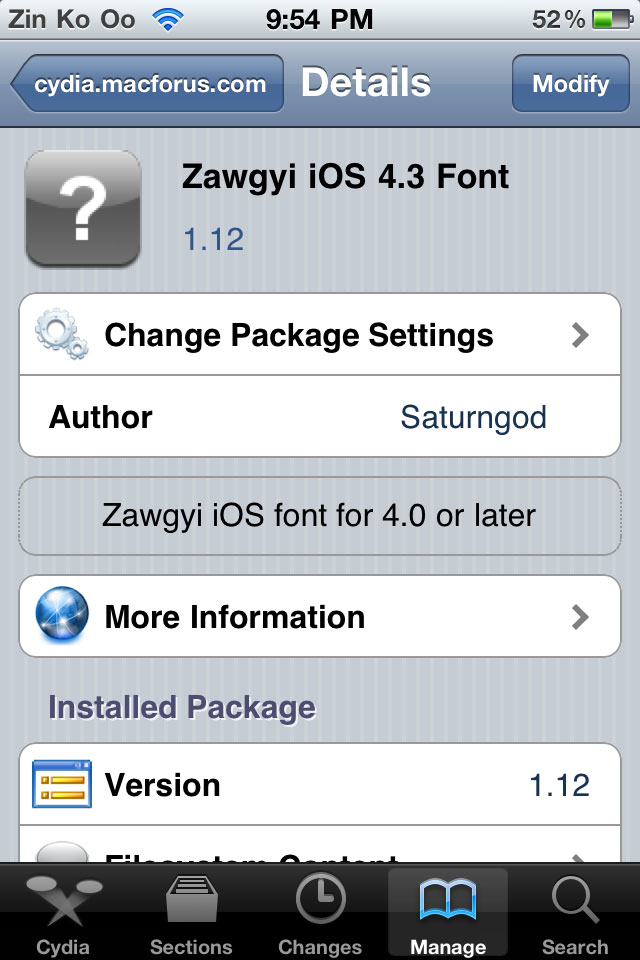
ျပီးသြားျပီဆုိရင္ စက္ကုိ Respring လုပ္ (သုိ႕မဟုတ္) power ပိတ္ျပီးျပန္ဖြင့္ပါ။ ျမန္မာစာနဲ႕ေရးထားတဲ့စာသားေတြကုိ ျမန္မာလုိျမင္ရျပီျဖစ္ပါတယ္
ေနာက္တနည္း
How To Install Zawgyi (Myanmar) Font To iPod
ၿမန္မာစာ ထည့္ဖုိ့ဆိုရင္ iPod Jail Break ရပါမယ္။
ပထမဆံုး Cydia ကိုသြားၿပီး "Souces" ကိုေရြးလိုက္ပါ...
It only works in Jail Broken iPods...
First, go to Cydia and tap "Sources" as shown below.

Tap Edit and than Add

Than.., type http://cydia.macforus.com/
and tap "Add Source"

And the screen shown below will appear..,
It will take about 30 secs depends on your WiFi or what ever speed is..,

After that, Go back to Cydia/Manage/ and tap where the red circle is shown.

And next.., tap on "Zawgyi Font" where the red circle is shown.

Than tap on "Install" where the red box is placed.

After Downloaded, (seeing those black staff)
Cydia will ask you to respring...
After you respring.., Just go to Safari
and type down some burmese website..,
I used "soneseayar.blogspot.com"
And.., here you go.. enjoy reading myanmar words in your iPod
ဗြီဒီယိုနဲ႕ၾကည့္ႏိုင္ရန္
Myanmar Zawgyi font and keyboard for iPhone4/4s iOS 5.1.1 And iOS
How To Enable Myanmar Font in iPod Touch or iPhone
http://netthitsar.blogspot.com/2012/09/1-iphoneipad-ipod-touch.html
IT Guide Myanmar မွ ကူးယူတင္ျပအပ္ပါတယ္။
ေရာက္လာသူအားလံုး ကိုယ္စိတ္နွစ္ျဖာ ခ်မ္းျမသာယာရွိၾကပါေစ။

Did you know that you can shorten your links with AdFly and get $$$$ from every visitor to your shortened urls.
ReplyDelete